Mealime is closing October 21Mealime closed October 21, 2026
Mealime is closing. Here's how to keep your recipes.Mealime is gone. Here's what still works.
Last day: October 21, 2026
Mealime deletes your account at shutdown, favorites, plans and your own recipes with it, and there's no export. You can still save all of it properly before the 21st.
Mealime deleted every account when it closed: favorites, plans, and the recipes people wrote themselves. Two things still bring your favorites back: screenshots you took of your Favorites, and searching for Mealime's recipes by name.
Bring my recipes over Watch how
- Took a screenshot of your Favorites before it closed? Tap below and choose it. Halite finds each full recipe, steps and photos included.
- In the Mealime app, open Favorites and take a screenshot. Long list? Scroll and take a few.
- Come back here, tap below and choose them. Halite finds each full recipe, steps and photos included.
Choose my screenshots Watch how
What's actually happeningWhat happened
Mealime's own recipes carry on in Meals Hub inside the Albertsons store apps. Your favorites list, your plans and the recipes you added yourself were account data, and Mealime deleted all account data on October 21 (mealime.com/closing).
Mealime's own recipes, including the ones you favorited, carry on in Meals Hub inside the Albertsons store apps. Your favorites list, your plans, and the recipes you added yourself are account data, and Mealime deletes all account data on October 21. Its FAQ names no way to carry them into Meals Hub (mealime.com/closing). There's no export feature either; the workaround going around is printing recipes to PDF, one by one. If you'd rather your recipe box not live inside a supermarket app, here's the way out.
Three ways to bring your recipes overTwo ways that still work
From a computer: one click gets everything Automatic
The only path that gets everything: every favorite, this week's plan, recipes too new for Mealime's public site, and the recipes you wrote yourself in the Mealime app.
On your phone right now? Do the screenshots above first. Then open halite.cc/mealime on a computer before the 21st for anything you wrote yourself and this week's plan.
- Drag this button to your bookmarks bar. Once. Send to Halite
- Sign in at my.mealime.com on that computer. If you normally use app.mealime.com, it's the same account; just open my.mealime.com.
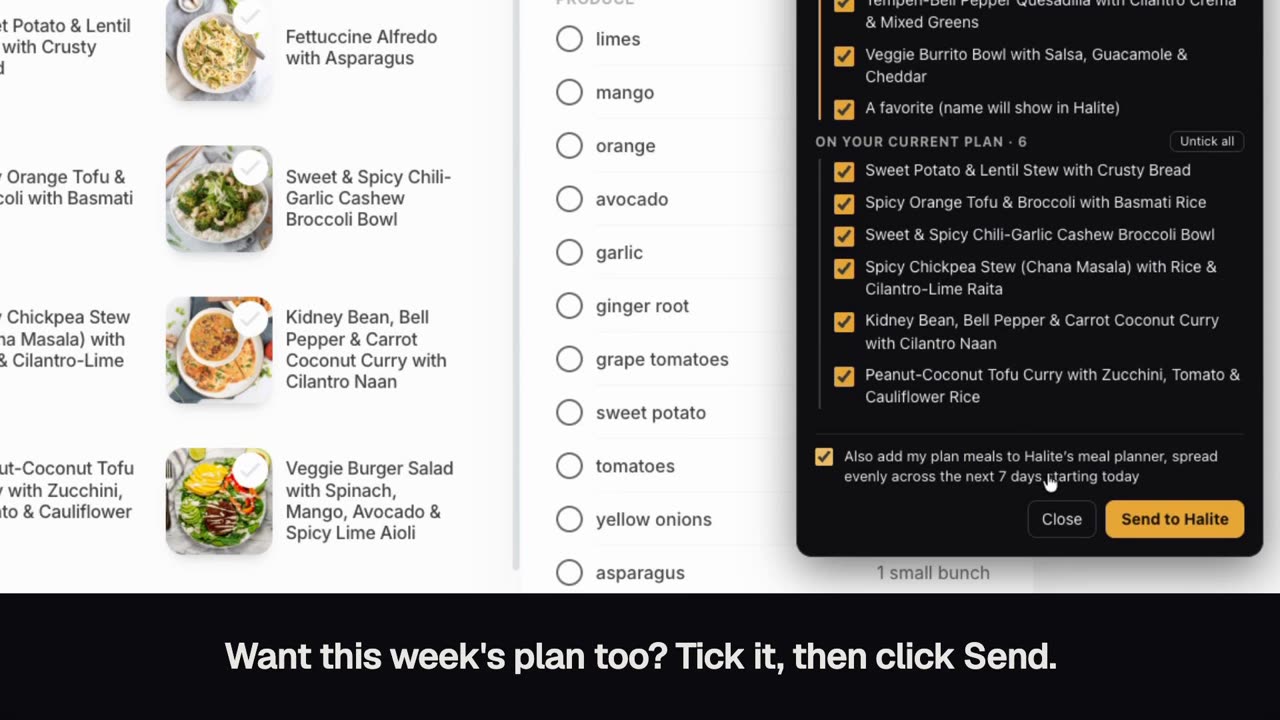
- Click the bookmark while you're on the Mealime page. A panel lists your favorites and any recipes you wrote yourself, already ticked, plus this week's plan meals to tick if you want them.
- Tick what you want and click Send. Halite opens with the list ready. Sign up if you're new; your list survives that.
- Want this week's plan too? Tick "Also add my plan meals to Halite's meal planner" in the panel. The meals land across the coming week; one tap from there sends the ingredients to a shopping list.
On trust: the button reads the list on the page and hands you a link. It sends nothing from inside Mealime and stores nothing. Read the code; the bookmark runs that file, verbatim.
From your phone: screenshot your Favorites Semi-automatic
Halite reads the recipe names off your screenshots and matches them to Mealime's recipes, so nothing gets retyped. It can't see recipes you wrote yourself; those need the computer method.Recipes you wrote yourself were deleted with your account, and nobody can bring those back, us included.
- Open Favorites in the Mealime app and take a screenshot. Long list? Scroll and take a few more.
- Open Halite's Mealime import page on your phone. No account needed yet.
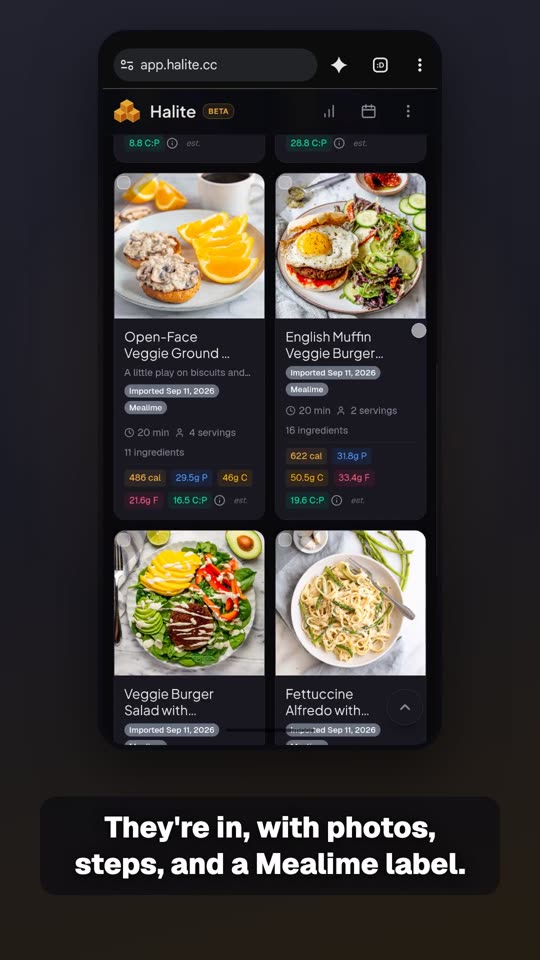
- Tap "Choose screenshots" and pick the ones you took. Halite shows the matches with photos, and flags any it couldn't find.
- Tick what you want and tap Import. If you're new, you'll create a free account here; your list waits for you on the other side. Ingredients, steps, servings, and nutrition come from the real recipe, not the picture.
Search for it
The last resort: no screenshots, no computer, just a memory of "the one with tempeh". Mealime's own recipes only.
No screenshots? Type part of the name you remember, like "the one with tempeh". Mealime's own recipes only.
- Open Halite's Mealime import page. No account needed yet.
- Type part of the name into "Search the catalog". Matches appear as you type.
- Tick the ones you want and tap Import. Sign in or create a free account at that point; your list comes with you.
What your recipes can do once they're here
- Plan the week around what you have. Tap Plan my week, pick something you've got (chicken, a can of beans) and how many nights, and Halite picks dinners that share ingredients, so the shopping list stays short. Each item on the list shows which meals use it, and anything in your pantry isn't counted. The picking is plain arithmetic on shared ingredients; no AI chooses your week.
- Leftovers get used. Turn on Use it up and Halite spends the half bunch of cilantro on another meal and turns tonight's extra servings into tomorrow's lunch. Mealime did this math for you, and now Halite does too.
- Something to cook before you've imported a thing. Halite comes with a free collection of recipes from USDA MyPlate Kitchen and other public sources, with the MyPlate ratings. Browse it in Discover, or let Plan my week choose from your recipes, the collection, or both. Your current Mealime plan can come over with your favorites, too.
- Any number of servings. Mealime scaled to 2, 4, or 6. Halite scales to the number you type, and it can go the other way: tell it what you have on hand and it works out the batch.
- Change a recipe in plain English. "Make it dairy-free." "Swap the salmon for chicken." The ingredients and steps rewrite themselves, and the original stays saved as a version.
- Add anything, not just Mealime's recipes. The blog your aunt sent, a YouTube video, a photo of a handwritten card. Halite saves it all in the same library.
- Leave whenever you want. If you ever move to another app, export your whole library from Settings, recipes and photos included, in one file. You just lived through the alternative. We won't do that to you.
Leaving a different app? See the guides for Yummly, Samsung Food, and Paprika.